QR codes are everywhere today. They are two-dimensional (2D) barcodes generated through a free QR code builder that hold a variety of data and can be scanned with a smartphone camera or any scanning device.
There are two types of QR codes: static and dynamic, and each offers different features. Choosing the type of QR code to use depends on the user's needs.
For first-time users with tight budgets, static QR codes are the go-to. Mainly because they are free and embed the data forever. If this piques your interest, here’s everything you need to know about this type of QR code:
Table of Contents
What is a static QR code?
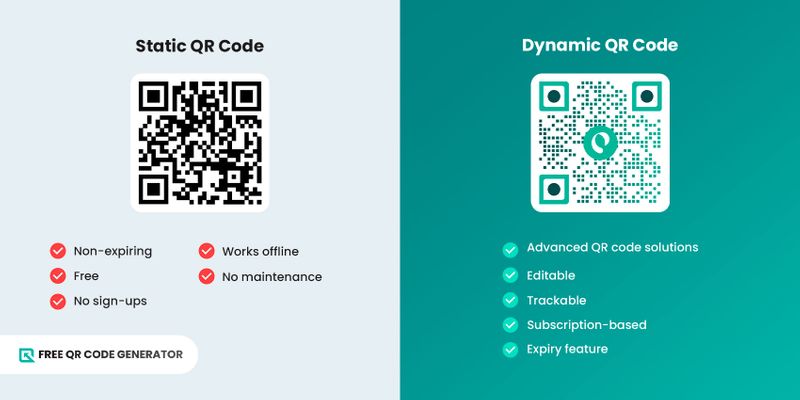
Also known as a free QR code, this 2D barcode permanently stores information, whether its a link to a website, text, or Wi-Fi credentials. It directly stores information in its patterns — known as modules — which represent binary data.
Whatever information you embed, a free QR code generator converts it into a specific size and arrangement of modules that collectively become a single QR code.
Since the data is embedded directly in the pattern, the amount of information affects the density of your QR code. The denser it is, the harder it is to scan, so static users must consider the size of their data at all times.
Advantages of this type of QR code
In 2025, statistics says 59% of smartphone users have scan a QR code everyday, proving the relevance of QR codes over the years. Here are the different advantages of using non-expiring QR codes:
Non-expiring
QR codes that are static are also known as permanent QR codes because of it’s nature. The embedded data does not expire over time or after a certain number of scans, as long as the embedded link is active and the image is undamage, the QR code will work just fine.
Free
Non-expiring QR codes are FREE. It will not require you to make either a one-time or a recurring payment, so you can create and use your code for as long as you want.
No sign-ups
When using a static QR code generator, there’s no need for you to sign up for an account. You can directly proceed with the QR code generation — no need to worry about form fill-outs, passwords, intrusive ads, and email reminders.
Works offline
Free QR codes technically work offline. They can still be scanned even without an internet connection to access the embedded data, particularly if it’s only a text. Even when you’re in a secluded area, these codes are handy.
No maintenance
Static codes require no attention at all; no account management, renewals, or dashboard monitoring.
When should you use a static QR code?
- When the embedded data does not update
- If your budget is constrained
- When you don’t need analytics
- If you’re a newbie on QR code technology
- When you want a trial first before getting the full dynamic experience
How do I know if my QR code is static or dynamic?
There’s quite a lot of difference between static vs. dynamic QR codes. Mainly, they differ in the features they offer and the limitations they impose. Here’s a quick comparison of the two:
- User sign-ups: Static QR code generators don’t usually require initial sign-ups to use. Dynamic QR code generators, on the other hand, would usually require you to sign up in order to avail a free trial privilege.
- Cost: Static QR codes are free and incur no fees, while a dynamic QR code would require continuous use and incur a subscription fee.
- QR code solutions: Only basic solutions are available in static form, which usually include a URL, Text, SMS, WiFi, Event, or Location. In terms of dynamic QR code solutions, it’s more about the advanced ones, such as social media, landing page, menu, or multi-URL QR codes.
- Editable: The edit feature lets you update the content even after the code is generated. Only dynamic QR codes have this feature.
- Trackable: The tracking feature monitors the performance of the QR code; only dynamic codes support it.
- Expiration: This feature allows you to set the activeness of your QR code; with a dynamic QR code, you can set until what time and date time can your QR code can be scanned. Static ones don’t offer this.
- Customization: QR codes are not always meant to be black and white only. When you want to personalize or design your QR code, you can use dynamic QR codes. Some static QR code generators may offer this, but that’s rare.
How to get your own QR code for free
1. Go to the Free QR Code Generator website.
2. Find a solution you wish to use.
3. Provide the required data, usually a link.
4. Click ‘Static QR code’ then ‘Generate.’
5. Customize your QR code design
6. Perform a test scan on your QR code
7. Download, then print or share.
Note: QR code generation steps may vary by generator; make sure to review the steps above.
Common permanent QR code solutions + use guides
If you’re looking for a free QR code solution, here are the usual options that generators commonly offer:
URL

The URL to QR code solution is the most common kind available on static QR code generators. It converts any link into a QR code.
Scanning this QR code will open the link in your device’s browser, so you no longer have to manually search for it.
🚀 Use guide: Do you have a brand website and having problems boosting website traffic? Convert the link into a QR code, then print or share online for maximum reach.
Text
If you want to turn short messages into a QR code, the text QR code solution is what you need. You can think of it as preserving the confidentiality of your message, hidden behind a code.
Note that not all free generators offer this feature.
🚀 Use guide: This solution is perfect if you have a specific message that you wish to relay to a lot of people.
Wi-Fi
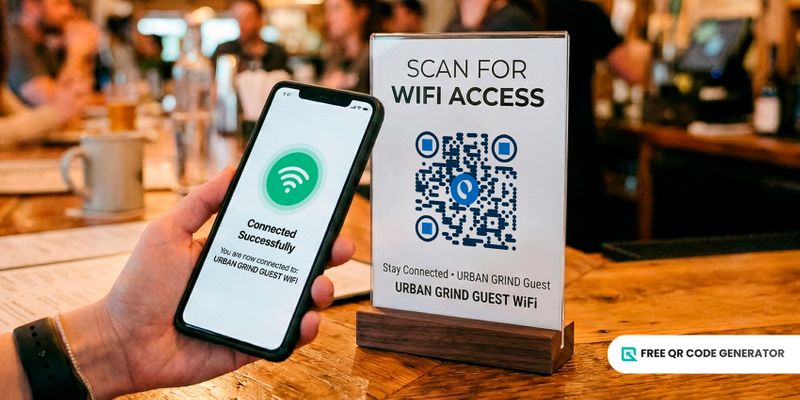
A WiFi QR code is a prominent static QR code solution. Scanning one will let you connect to the available network without manually entering the password.
🚀 Use Guide: You often see this type of QR code in restaurants, cafes, and some public spaces to provide customers with internet access. The best part is that you don’t need mobile data to scan this QR code, too.
SMS
The SMS QR code solution works by adding your phone number in it, or someone else’s, and then a message (could be an instruction, simple form, or a question).
🚀 Use Guide: If you own a business that operates by appointment, like a salon or clinic, you can share an SMS QR code to inquiring customers, asking them to send you a message to confirm their schedule or time of arrival.
The QR code for email messages works for sharing an email to various people whom you wish to receive responses from. You just need to prepare your email address, subject line, and message, then generate the QR code.
Anyone who scans the code can reply to your email by clearing out the message you left, and there’s no need to retype your email address.
🚀 Use Guide: If you’re working for a PR company, you can prepare a pitch with an attractive subject line and a comprehensive message. Turn this into an email QR code and share it for interested ones to scan and reply.
Why use the best free QR code generator
Static QR codes are meant to be an easy partner when planning your campaigns or daily activities. It’s a plus that you can create them for free!
They are hassle-free to manage, require less attention, and are still very effective. Just make sure to choose the most reliable free QR code generator — one that’s flexible and offers several features.
After all, the quality of your QR codes will depend on the reliability of the QR code builder you’re using. So it’s important to do proper research and several trials, and testing.
Frequently asked questions
Is there a free QR code scanner app?
There are several free scanners for QR codes in app stores, but if you don’t want to download an app, check your phone for the built-in QR code scanner.
Simply open your camera and hover the QR code; it should open to the embedded data immediately or a preview of the link.
Can Google create a QR code?
Yes, Google can create a QR code. Simply look for the share button link and then click the “Convert QR code” button, or you may also right-click the link and click “Create QR code for this page.”