A recent industry report found that the majority of users scan QR codes that offer value, come from a reliable, safe source, and disclose their privacy and data-use policies.
This explains why businesses are increasingly seeking a safe, free QR code generator that prioritizes security, meets their needs, and delivers results.
In a time when data privacy is a top concern, it’s important to determine which free generators are indeed safe to use.
We have a list of the top QR code platforms that are both safe and free to use in 2026.
Key takeaways
- Free QR Code Generator is the safest all-around platform
- QR TIGER is the best advanced QR creator with security compliance
- QR Creator is the best for free, editable QR codes
- GoQR is the best for straightforward QR code generation
- QRTRAC is the best for uncommon QR code solutions
- QRStuff is best for time-gated free QR codes
- TEC-IT is best for choosing specific encoding and error correction levels
Table of Contents
Is a QR code generator safe to use?
Short answer: It can be safe—but not all QR code generators are. The safety depends entirely on the platform you choose and how you use it.
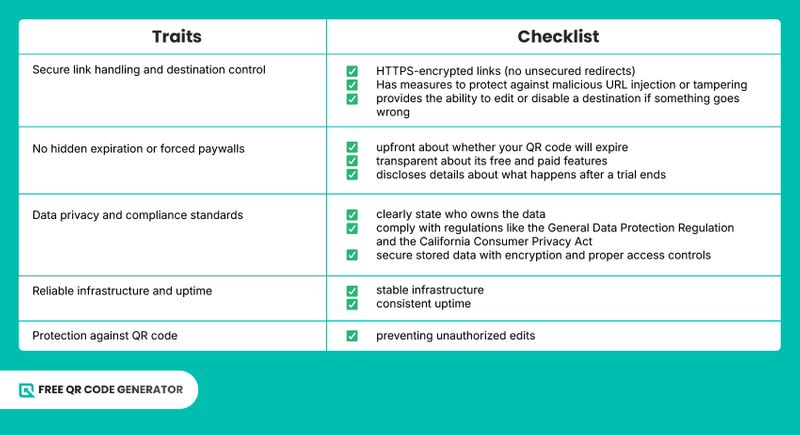
A QR code maker is generally safe when it doesn’t secretly expire or deactivate your codes, links are served over secure (HTTPS) connections, and there’s clear information about data handling and privacy, among others.
It becomes risky when the tool doesn’t disclose how it handles your data, uses unreliable redirect systems (leading to broken scans), or allows unsafe or unverified links without safeguards.
Taking into consideration the dangers of online QR code generators and being selective about the tools you use are critical practices that help you avoid deploying QR codes that break, misdirect users, or compromise customer safety—and, in turn, your brand’s reputation.
Checklist: Traits of a secure QR code generator
Top 7 safe and free QR code generators online
| FEATURE | STATIC QR CODES | DYNAMIC QR CODES |
| Payment | Free | Subscription-based |
| User account | No sign-up required | Sign-up required |
| Availability of solutions | Basic (usually URL solution only) | Advanced (includes vCard, social media, file, etc.) |
| Customizable | ✅ | ✅ |
Now that you know what a secure QR code generator should have, let’s take a look at 7 of the best platforms, breaking down each of their features, pros, and cons to highlight why they are at the top.
Why you should trust us
Our list is based on practical evaluation of key factors such as security, data privacy, reliability, and long-term usability. We prioritize free platforms that demonstrate transparency in how QR codes are generated, managed, and maintained over time.
1. Free QR Code Generator
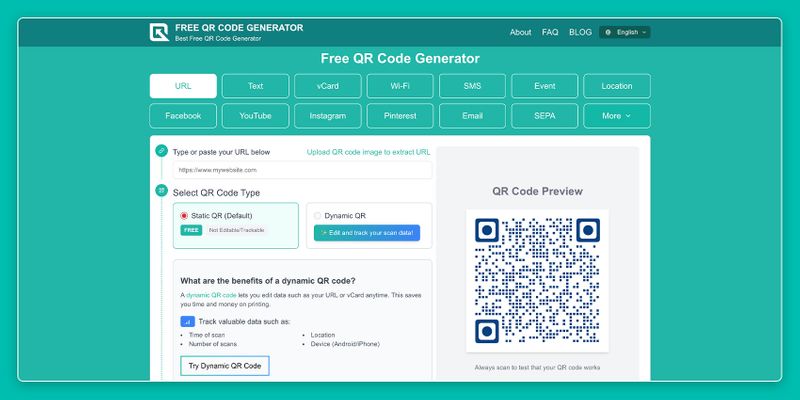
Free QR Code Generator is a platform that offers several static QR code solutions for free, including vCard, location, and SEPA payment options.
From a safety and privacy standpoint, it performs well because users can generate QR codes without registration, reducing exposure of personal data and the risk of information compromise in a security breach.
Additionally, the platform operates without tracking cookies, limiting the collection of behavioral data, such as browsing activity and user preferences.
As for QR code management and downloads, the QR codes aren’t stored on the website, given that it doesn’t require account creation.
Downloading the QR codes did not pose any security risks to the devices (smartphone and laptop) used for testing or their stored data. The URL embedded in the QR code also appears exactly upon scanning.
Core Features
- Zero hidden fees for static QR code solutions
- Static QR code generation
- QR code customization
- PNG file download
- Safety Traits
- No registration needed
- No cookie collection
- Allows for transparent branding and scanning confidence
- Consistent uptime
Pros
- 12 available QR code solutions
- Straightforward user interface
- Comprehensive list of options for eyes, patterns, and colors
- Logo integration
- Frames for calls to action
Cons
- QR codes can only be saved as one file format (PNG)
- Some solutions are only available through registration, such as the social media QR code
2. QR TIGER
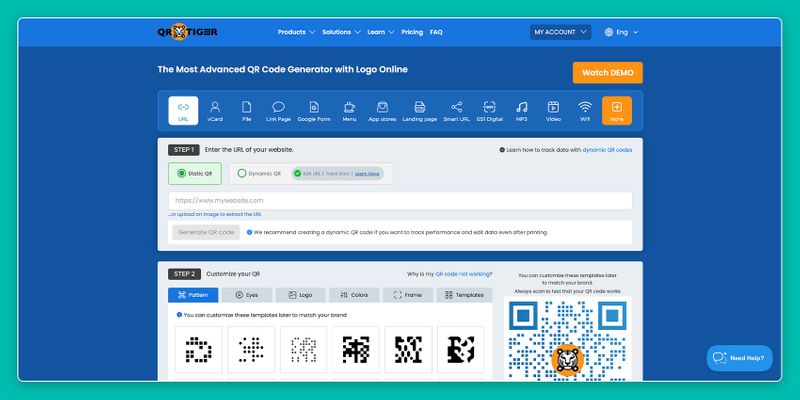
QR TIGER is the best free QR code generator trusted by users worldwide. While it’s not 100% free, you can create both static and dynamic QR codes under its free plan, making it a reliable platform for those looking for both permanent and editable solutions.
Security-wise, it is a top-tier platform that adheres to the General Data Protection Regulation (GDPR) and the California Consumer Privacy Act (CCPA). For enhanced safety, QR TIGER also complies with ISO 27001:2022.
In addition to regulatory compliance, the platform includes safety measures such as two-factor authentication and internal audits. It is also ever-present for its users with 24/7 customer support.
Regarding management, only the dynamic QR codes are stored in the user’s account dashboard with access to advanced tools. The static ones, on the other hand, can be downloaded directly to devices.
Downloading the QR codes poses no security risks, and the redirect link uses HTTPS
While its freemium plan offers a lot from the start, advanced features such as additional analytics and QR code password protection are only accessible in its paid plans.
Core Features
- Static and dynamic QR code generation
- Customization suite with logo integration
- Basic scan analytics
- PNG and SVG download
- Safety Traits
- GDPR, CCPA, and ISO 27001:2022 compliant
- Advanced safety tools like 2FA
- 24/7 customer support
- Data encryption
- SSL encryption
- White label for deep branding (paid feature)
- Dependable infrastructure and consistent uptime
- Upfront about free and paid features
Pros
- 24 available QR code solutions, including GS1 QR codes
- User-friendly QR code generation
- Extensive customization options for free users
Cons
- Free users are still required to sign up
- Limited to 3 dynamic QR codes, capped at 500 scans each
- Improved features, like advanced analytics, require a paid subscription
3. QR Creator
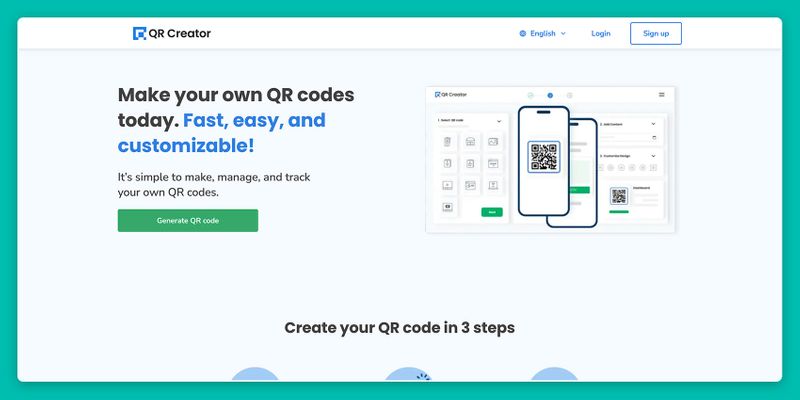
Another free QR code generator without a subscription required is QR Creator, which lets users create both static and dynamic QR codes with no strings attached.
What sets this platform apart from the rest is how it handles its dynamic QR codes. Most platforms allow QR code editing from their dashboard, provided the user has made an account. This isn’t the case with QR Creator.
When creating a dynamic QR code, users will be given a password to edit it. This password can even be edited, but they will have to provide an email address for security.
Core Features
- Static and dynamic QR code generation
- QR code customization with logo integration
- Error correction
- PNG, SVG, and JPG file formats
- Safety Traits
- No registration required
- Password-protected dynamic QR codes to prevent misuse
- Transparent branding and scanning confidence for generated QR codes
- No hidden fees or paywalls
Pros
- 11 available QR code solutions
- Generates editable QR codes
- Passwords can be generated or set to access editing
Cons
- Limited customization options
- QR code customization can be inconvenient thanks to drop-down menus
4. GoQR
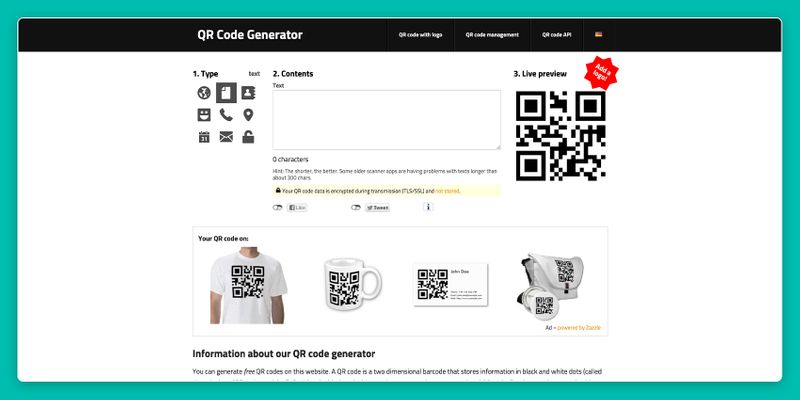
GoQR is a free and safe QR code generator that is transparent with its users about the encryption used to send them their QR codes. Additionally, no registration is required to use its service, and it does not store QR codes generated on its platform.
Something to note about this platform is that generated QR codes are uncustomizable. However, they do offer logo integration for a price.
Fortunately, data exchanged during the transaction is protected by the German Federal Data Protection Act (BDSG), the German Telemedia Act (TMG), and other data protection regulations.
Core Features
- Static QR code generation
- Safety Traits
- No registrations required
- Compliant with the German Federal Data Protection Act (BDSG), the German Telemedia Act (TMG), and other data protection regulations
- SSL/TLS encryption
- Upfront about paid logo integration
Pros
- 9 QR code solutions
- Simple user interface
Cons
- No QR code customization
- Logo integration is a paid service
5. QRTRAC
QRTRAC is a platform that complies with the GDPR, the UK’s GDPR, and the CCPA. This makes it one of the safest QR code generators for user data.
Moreover, creating QR codes with QRTRAC requires no subscription or registration, further securing user privacy.
QRTRAC also offers a wide range of QR code solutions, including unique options like ISBN codes. Unfortunately, free users can only get static QR codes with limited customization and branding.
Core Features
- Static QR code generation with no registration
- Basic QR code customization
- PNG file format downloads
- Safety Traits
- QR code generation requires no user registration
- Compliant with the GDPR, the UK GDPR, and the CCPA
- Upfront about paid and free features
Pros
- 50 QR code solutions, available with no registration
- Straightforward user interface
Cons
- A QRTRAC account is required to access more customization options
- Users have to navigate through menus to find their free generator
6. QRStuff
QRStuff is a secure generator that complies with the regulations set by the GDPR and the Data Protection Act 2018 of the Isle of Man (United Kingdom).
Moreover, it is always available to its free users via email, so concerned customers receive assistance as soon as possible.
While this free QR code maker requires registration, registered users can generate up to 10 dynamic and 5 static QR codes per month. However, QR code customization and other essential features are locked behind a paywall.
Core Features
- Email customer support
- Dynamic and static QR code generation
- PNG and JPG file format downloads
- Safety Traits
- Compliance with the GDPR and the Data Protection Act 2018
- Customer support, starting with emails at the free plan
- Protection against QR code misuse through account registration
- Transparent about paid features
- Upfront about QR code time and scan limits
Pros
- 33 QR code solutions
Cons
- Limited number of QR codes (10 dynamic QR codes and 5 static QR codes)
- 30-day time limit on QR code scannability
- QR codes can only be scanned 50 times a month
- QR code customization is unavailable to free users
- The user interface can be tricky to navigate
7. TEC-IT
Last on our list is TEC-IT, known for generating various barcode types, including QR codes. As a static QR code generator, it complies with GDPR to protect users who register for all services, while it requires no registration for those who prefer not to.
While a reliable platform, the generator lacks branding opportunities for its QR codes. On the bright side, users can set the error correction level and the encoding used.
Core Features
- No registration required
- Static QR code generation
- Error correction level and encoding selection
- PNG file format download
- Safety Traits
- Compliance with GDPR
- No registration needed
Pros
- 12 available QR code solutions
- Straightforward QR code generation
- Ability to decide QR code encoding, quiet zone size, and resolution
Cons
- No QR code customization
- Users with no accounts can only choose a DPI between 96 and 300
Pro tip: How to get a free QR code without risking your data
According to the Pew Research Center, only one in five Americans says they always read a company’s privacy policy before agreeing to it. Because not everyone goes out of their way to be informed, malicious actors can easily take advantage of them.
To get a free QR code without putting your data, audience, and business at risk, always perform the following:
- Look for the software’s user ratings and reviews
- Check the website’s SSL certificate
- Evaluate the platform’s domain authority
- Assess the website’s interface
- Go through the generator’s privacy policy
- Visit its Frequently Asked Questions section
Our safest recommendation
All of the platforms on this list follow different measures to protect user data while providing excellent QR code generation. While choosing one ultimately depends on your needs, we recommend going for the platform that provides you with security.
Free QR Code Generator is that kind of tool. It requires no sign-ups, meaning user information is not at risk of exposure.
What’s more, it doesn’t collect browser cookies, keeping user preferences private. All of this while providing fundamental QR code solutions and comprehensive branding opportunities.
Feel free to check out the other safe and free QR code generators on this list to see which one works for you.
People also ask
What is the safest QR code type?
The safest QR codes are password-protected and generated with a secure QR code maker that holds security certifications, like QR TIGER.
Are free QR code generators really free?
Some basic QR code makers are also safe, like Free QR Code Generator, since they will not require you to provide any personal information, so any confidential data remains safe.
Is it safe to scan QR codes?
Yes, scanning QR codes is generally safe. This is because they are only used to store information inside. However, the information inside could lead you to malicious websites or apps, so utmost caution is required.
Which free QR code scanner is safe?
The safest free QR code scanner is your mobile device’s camera. Modern smartphones come with software that can decode QR codes, so simply using your camera is the most secure way to perform scans.
Is there a free QR code that lasts forever?
Static QR codes are 2D barcodes that store data, making them a permanent medium for digital information. Several online platforms offer free static QR code generation, with or without registration.