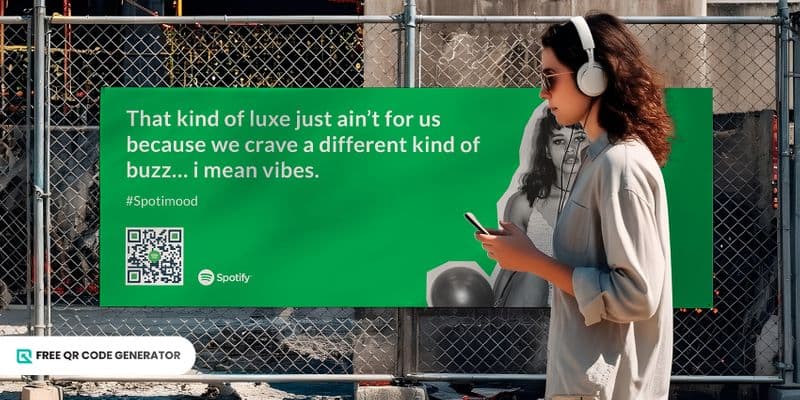
The Spotify QR code is like a secret musical portal. It requires no links and no typing. With just a simple scan using a smartphone, you can listen to a podcast, song, or an entire album or playlist.
It makes content sharing and promotions faster, smoother, and way more enjoyable.
Keep reading to learn how to make and use this QR code.
Table of Contents
How to get Spotify QR code?
There are three methods you can follow to create this code: using the Spotify code maker on the app and the web, and a third-party free QR code generator.
Using the Spotify mobile app
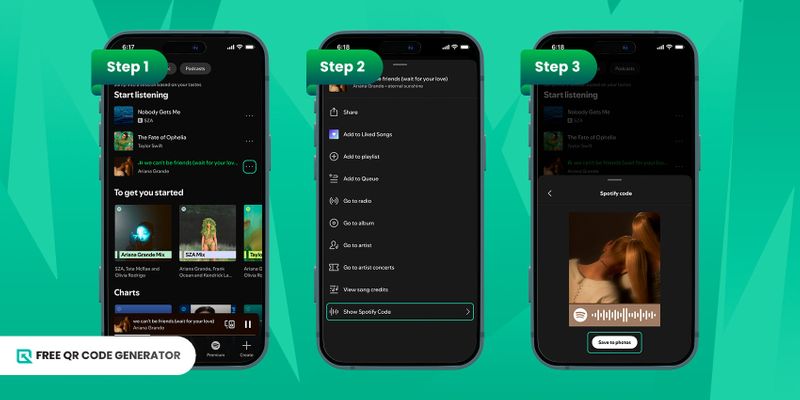
Spotify also features a QR-like code that allows you to share and access any content on the streaming site, including songs, podcasts, or entire albums.
To generate it through the app, follow the steps below:
1. On your selected Spotify playlist or song, click the three dots to open “more”.
2. Scroll down to show the Spotify code.
3. Save it to your gallery or scan the code.
Note: This QR code can only be scanned using the in-app camera.
Using Spotify Codes (web-based)
To create a QR code using the ‘Spotify Code’ page, follow the steps below:
1. Select the playlist or song and click Share. Now you have a Spotify URI.
2. Now paste this on the Spotify Code webpage.
3. Click on “Get Spotify Code”.
4. Customize the code.
5. Download.
Using a free QR code generator
To create a free QR code for Spotify content on your browser, follow the steps below:
1. On the Spotify app, click the three dots.
2. Locate the share button of the content to copy its link.
3. Go to our free QR code generator and paste the Spotify link.
4. Choose a QR code type: Static (fixed) and Dynamic (trackable and updatable).
5. Generate the QR code.
6. Customize it by adding the Spotify logo and changing the colors.
7. Test the QR code and download.
Spotify QR code scan: Step-by-step guide
There are several methods to successfully scan a default Spotify code or a custom-made QR code.
Using the Camera app
1. Open the camera app on your phone.
2. Point it towards the QR code.
3. Click on the link that appears on the screen to open the Spotify content.
If you don’t have a Spotify app on your phone, you’ll be directed to the web version of Spotify.
Using Google Lens
1. Open Google Lens.
2. Upload the QR code from your phone’s album or point the camera toward the QR.
3. Click on the link that appears on the screen.
You’ll be directed to the specific content on Spotify.
Using the Spotify app
These steps specifically apply to the default sound codes by Spotify:
1. Open the Spotify app.
2. Click on the magnifying glass icon seen at the bottom of the screen.
3. In the top right corner, you can find the camera icon. Click on it.
4. Point the camera towards a QR code.
5. Click on the link, and you will be directed to the content.
10 creative uses of Spotify QR
There are all sorts of ways to use the Spotify code creatively, not just for convenient sharing of Spotify content, but also for reaching your audience and increasing streams.
1. Launch new artists and songs
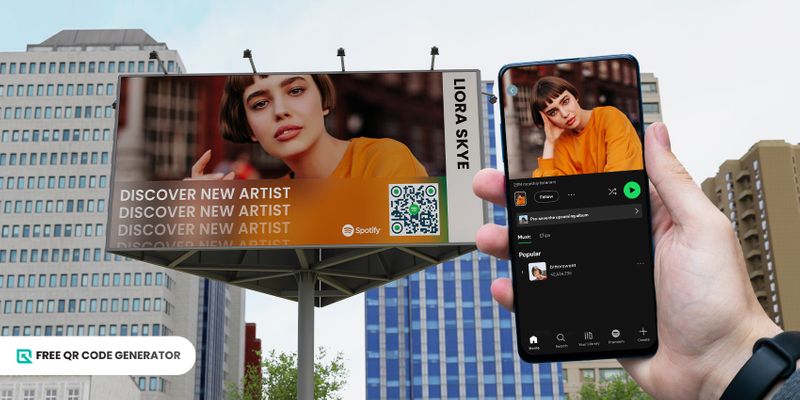
Imagine your company planning a music festival. You’ve got a lineup full of fresh, social-media-famous artists, and you want to introduce them to an even bigger audience.
When preparing your flyers, posters, or banners for the event, be sure to include a QR code that links directly to each artist’s Spotify profile. It’s an easy way for people to discover their music before the show.
All you have to do is create the code using the Spotify playlist QR code generator, download it, and drop it into your design. Easy and effective.
2. Promote Spotify content on merchandise
If you’re an artist management company or a merch brand, this one’s a total win.
Create and customize QR code that links to the Spotify playlist of the song or artist you want to promote. Then, download it and print it on a T-shirt, mug, cap, or any other merchandise you’re selling.
Here’s another idea: If you’re hosting a music event, have your team and volunteers wear T-shirts printed with the artist’s Spotify Playlist QR code.
The best part here is that you can add your own brand logo to the t-shirt design for extra visibility and effortless promotion.
3. Gift packaging
The festive season is right around the corner, and you’re probably gearing up to send out complimentary gifts to your clients and partners.
Add a little extra thought to it. Create a holiday playlist on Spotify, copy the link, and turn it into a QR code. Then print the code and place it on your gift packaging.
Top it off with a fun message, like “Scan for festive vibes” or “Scan for holiday tunes.” It’s a small touch that makes the gift feel way more personal.
4. Set the mood at restaurants
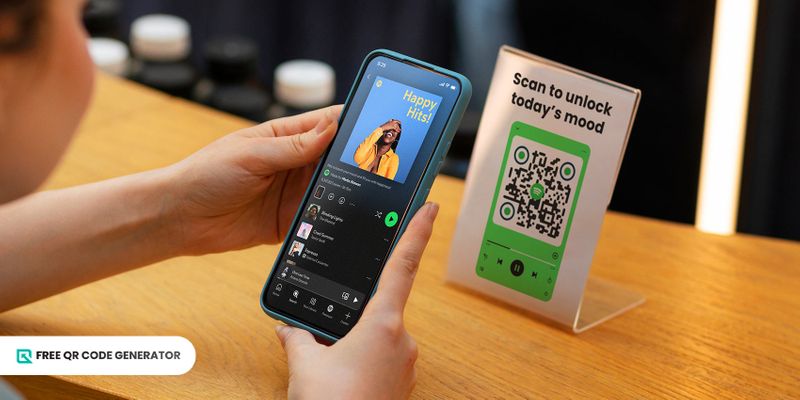
Remember those coin jukeboxes in old-school diners? Well, Spotify is the new-age jukebox.
If you run a restaurant or café, create a Spotify playlist that matches your place’s vibe. Turn the playlist URL to QR code and place it on your tables with a fun CTA like “Scan to unlock today’s mood.”
And if you create a dynamic QR code for it, you can update the playlist to keep it fresh — no reprinting is needed.
5. Spotify playlist QR code for fitness gyms
Are you a gym owner with clients who never take their earphones off? Let’s help them out because every gym rat is always hunting for new workout playlists.
Create a playlist on the Spotify music app just for your gym and turn it into a QR code. Print it on posters, and place them around the workout area. Be sure to add a catchy CTA, like “Unlock motivation in a scan.”
You can even throw in some motivating gym quotes on the posters to make them look more eye-catching and energizing.
6. Spotify QR code for wedding events
Music is one of the sweetest ways to express love.
If you’re planning a wedding, create a Spotify playlist filled with songs that tell the couple’s story — tracks that mark their journey or simply remind them of love.
Turn that playlist into a Spotify QR code and place it on the wedding invitations.
It works beautifully for both printed and digital invites, adding a personal touch everyone will appreciate.
You can even add it to your Vcard and share it with your network to add a creative touch.
7. Stage property viewings for real estate
If you have a real estate company, you’re probably creating posters and flyers to showcase a new property.
Whether it’s residential or commercial, consider the vibe or vision of the space and create a playlist that complements it.
Then, while promoting the property to potential buyers, add the dynamic QR code for Spotify playlist to your materials with a fun CTA like “Scan to feel this place.”
You can also add some podcasts from real estate experts to the same playlist QR code. These take-home tips will help clients decide the best place for them.
8. Product packaging
You’ve probably heard of color language. Well, music works the same way. Different tracks carry different moods and themes.
Here’s an idea for your next product launch: create a Spotify playlist or select a song that matches your product’s vibe.
For skincare, go for something calm and soothing; for a gaming gadget, choose a high-energy or hype mix.
Turn that playlist or song into a Spotify QR code scannable and place it right on the packaging. It’s a fun way to add personality to your product.
9. Music for bookstores and libraries

If you’re a librarian or bookstore owner, here’s a simple idea to try. You can’t play loud music in a reading space, but many readers love listening to soft tunes or nature sounds while they read.
Create a Spotify playlist containing calming music, nature sounds, or any other audio that helps with focus, and then convert its link into a QR code.
Place the QR code in various corners of your library or bookstore, accompanied by a small note inviting people to scan it for improved concentration.
Who knows. You might end up creating a little reading companion for your visitors.
10. Audio QR codes for art exhibits and museums
Create a playlist on Spotify and convert it into a QR code to provide your audience with a more immersive experience.
Think about what the exhibit is trying to convey: is it calm, intense, nostalgic, or dramatic? Select a playlist that aligns with the theme and complements the mood.
Once you curate the playlist on Spotify, convert it into a QR code, download it, and place it next to the exhibit with a simple CTA.
For museums, compile podcasts on the importance of preserving artifacts or sentimental collections and turn them into a QR code for easy integration into educational materials, such as brochures and flyers.
Spotify vs. Free QR Code Generator: Which is better to use?
Now that you know about the different methods for creating a QR code for Spotify content and how to use it, we’re left with one question: which platform should you use?
We’ve compared the two platforms in four key areas to help you make an informed decision.
Accessibility
Sure, Spotify codes are easy to scan — but QR codes created with a free QR code generator are even more accessible, since they work on almost any mobile device with a camera.
On the other hand, Spotify codes can only be scanned through the Spotify mobile app.
Familiarity
When you hear the word “QR code,” you probably picture a square with a patterned design and maybe a logo in the middle.
A Spotify code looks completely different. It typically displays the album, song, or artist cover, accompanied by a Spotify-style waveform at the bottom.
Because it doesn’t look like a typical QR code, many people won’t recognize it as one — and that could cost you some scans.
In short, a custom QR code for Spotify is a better option for your marketing needs.
Customization options
Yes, Spotify lets you create a scannable code, but ask yourself: are you promoting your brand or Spotify?
Unlike the music streaming service, you can customize the design of your code on a free QR code generator to match your brand’s identity using your own colors, logo, and style.
Scalability
Let’s say you place the code somewhere a bit far away and decide to use a Spotify code.
Even if someone tries to scan it, their phone’s camera may not be able to capture it properly because the Spotify scanner does not have zoom capabilities. That’s why Spotify codes work best on small items, such as flyers and brochures.
Meanwhile, a custom QR code can be scanned easily from a distance using the phone’s normal camera.
Spotify QR code: The mixtape of the digital age
Sharing Spotify content just got even more convenient and enjoyable. With these scannable codes, artists, creators, and marketers can reach even more listeners, both online and offline, more effectively than links can.
Plus, with the Free QR Code Generator, you can create on-brand codes that never expire and stay active forever. So what are you waiting for?
Create and share a QR code for your Spotify playlist today!
FAQ
How to make QR code for Spotify playlist?
To create a QR code for your Spotify playlist, copy the playlist link and paste it into a QR code generator.
Customize it if you'd like, and then download the QR code. You can then use it on posters, packaging, or social media.